Carsharing is a short-term car rental, and Citydrive is the carsharing service in Moscow, Saint Petersburg, Sochi, Yekaterinburg, Nizhny Novgorod, Krasnodar. You can sign up in the app, find the nearest car and go on your way.
This is free time to reach the car. The duration depends on your loyalty level.
Levels «Explorer», «Motorist», «Ringleader», «Enthusiast»:
- free waiting time is calculated automatically based on your distance to the car (5–20 minutes);
- you have one free booking available within 2 hours.
Levels «Machine», «Road Star»:
- 20 minutes free;
- you have one free booking available within 2 hours.
During your booking, other users can’t take the same car.
If the car is marked with a green circle, you can change your mind and cancel the booking.
When the car is marked with a red sign «out of green zone», it’s impossible to cancel the booking while it is ongoing. But if the car is severely damaged or has no documents inside, contact our support service:
Download the Citydrive mobile app in RuStore, App Store, Google Play, Huawei AppGallery or use web-version, sign up with your driver’s license, passport and bank card. It’s online and you don’t need to go anywhere.
When you upload documents’ photos and link the bank card, we’ll check everything and give you access to the service. Don’t worry about your personal data — it will be heavily guarded.
You can enter a promo code when signing up or later — in the Promo codes section of the app. The discounted price will be in the receipt after the trip. In both cases, the promo code needs to be entered and activated before reserving the car.
Anyone who has a valid driver’s license in category B. Driving experience is now non compulsory.The minimum age is 18 years.
Citydrive has:
- per-minute tariff for short trips;
- tariffs from 1 hour to 7 days for long trips;
- Fix tariff with a pre-known price;
- The pricing for each individual tariff depends on the user’s reputation in the application.
Per-minute tariff
It has three options with different costs:
- In use option — turns on when you start the car;
- Parking option — works if you have turned the car off, closed the doors in the app, but haven’t ended the rental;
- Handover option — if you are outside the rental completion zone and don’t need the car anymore, you pay for the rental time according to the Parking option until someone else picks up the car.
In the per-minute tariff the rental price depends on the class of the car, current discounts and additional options, such as casco insurance. (By the way, for loyalty levels 4–5, comprehensive insurance is no longer free, but we provide a 100% discount. So the cost of trip will not increase.) A minute of renting the cheapest car will costs from 9.18 ₽ for In use option and 4.4 ₽ for Parking and Handover options.
In all cities, Citydrive has dynamic pricing for the per-minute tariff. Prices depend on demand, the number of cars in your area, traffic jams, the day of the week and the time of day.
Tariffs from 1 hour to 7 days
They are made for travels and other long trips. You pay a fixed amount for the rental itself plus for each kilometer of your trip.
In Tariffs from 1 hour to 7 days the cost depends on the class of the car, current discounts and additional options, such as casco insurance. Prices start from 160 ₽ for 1 hour and 8.20 ₽/km.
In Moscow and Saint Petersburg, there is dynamic pricing for 1-3 hours tariffs. Prices depend on demand, the number of cars in your area, traffic jams, the day of the week and the time of day.
Fix tariff
You enter the destination address, and we calculate the cost.
The time for the trip is limited, it may vary depending on the situation on the road. The countdown will start after the free booking and inspection. We will let you know when there are 5 minutes left. If the free time ends, but you haven’t started the trip yet, minutes will be charged according to the Parking option until you start driving.
It’s necessary to complete the rental in the arrival area. It is indicated by the green dotted line. If you complete the rental not in the arrival area or arrive later, the cost of the trip will be recalculated at the per-minute tariff.
4 weeks tariff
It’s like tariffs from 2 hours to 7 days, but gas and parking are not included. The price is 10 000 ₽ for 28 days plus 15 ₽/km.
4 weeks tariff is available for some Smarts in Moscow — you can find them by Long rental filter.
The higher the coefficient, the higher the prices
For example, if someone has an x2 coefficient, then all tariffs, mouthly pass, casco and toll roads with a transponder are twice as expensive for this user.
What does the coefficient depend on?
- On your age and experience. The smaller they are, the higher the coefficient and prices.
- On violations of traffic and Citydrive rules. The coefficient is higher within 200 km after payment of each fine.
- On debt. The coefficient is higher within 200 km after debt repayment.
How to reduce the coefficient?
If it’s slightly higher because of age or driving experience, just wait. And if it’s higher because of fines or debt, drive responsibly, and everything will be okay.
How does the price coefficient in the Reputation section interact with dynamic pricing?
First, the dynamic pricing coefficient is applied to the price, and then the reputation coefficient.
For example, a minute of renting Volkswagen Polo costs 8,64 ₽. With high demand, the dynamic pricing coefficient is x1,1, and a minute is already 9,5 ₽. And if at this moment the car is taken by a user with a bad reputation and a personal coefficient of x2, then it will be 19 ₽/min.
Citydrive has dynamic pricing. In Moscow and Saint Petersburg, it works for the per-minute, 1, 2 and 3 hours tariffs. In Sochi, it works only for the per-minute tariff.
Prices depend on demand, the number of cars in your area, traffic jams, the day of the week and the time of day.
You pay only for car rental. Gas, car maintenance, CTP insurance, washing and open paid city parkings are our concerns.
All of them if you are already 23 years old and have sufficient rating in the app, you can rent all cars. And if not yet, you won’t be able to take premium and electric cars, but even without there is plenty more to choose from.
Up to one week. If you’re going to have a short trip, You can choose the per-minute tariff. And if your ride is going to be long, pick tariffs from 1 hour to 7 days.
The green zone, or rental completion zone is an area on the map in the app where you can complete your rental and leave a car for a next user.
In Moscow and Saint Petersburg, the green zone covers almost the entire city and several areas beyond Ring roads.
In Sochi, the green zone includes the city itself, Adler and Krasnaya Polyana.
In Yekaterinburg and Nizhny Novgorod, operational areas can be found in the «Coverage zones» section on the website and in the application. So far it includes the center and nearby large neighborhoods.
After you sign up in Citydrive, you will see the map with green and black circles — these are cars that can be booked.
If you want to try a specific model or have special requests like a child seat, use filters. To open them, click on the «Filter» button in the app.
Let’s say you found the right car.
- Click the «Book» button — you’ll get free time to reach the car. The duration depends on your loyalty level.
Levels «Explorer», «Motorist», «Ringleader», «Enthusiast»:
- free waiting time is calculated automatically based on your distance to the car (5–20 minutes);
- you have one free booking available within 2 hours.
Levels «Machine», «Road Star»:
- 20 minutes free;
- you have one free booking available within 2 hours.
- Walk to the car.
- Open the car doors in the app, and 5 free minutes for inspection will begin.
- Inspect the car for damage and check if there are documents inside.
- If everything is fine, you can drive. And if there is serious damage or there is no vehicle registration certificate, call us: +7 (495) 223-06-90in Moscow+7 (812) 313-69-20in Saint Petersburg+7 (862) 291-51-14in Sochi+7 (343) 221-76-48in Yekaterinburg+7 (831) 200-15-74in Nizhny Novgorod+7 (861) 210-03-41in Krasnodar
- After the trip, complete the rental in the green or purple zone of the city where you started it.
The purple zone, or paid drop-off area, is a designated map area in the app where you can end your rental, but an additional fee will be charged.
Within this zone, the app displays the extra cost upfront — this amount will be added to your per-minute tariff when concluding the rental.
If you select the fix tariff, you specify your end address during booking; should it fall within a purple zone, we automatically include this fee in your final price shown on the «Book Now» button.
Rest assured, if you complete your rental in a purple zone, we’ll explicitly notify you about the added charge.
Purple zone fees vary by location, so always check the map before your trip to estimate your total cost.
You can find details about all drop-off zones in the «Carsharing Zones» section of the side menu.
All cars in Citydrive are insured under CTP, which is included in the rental price and is always valid. The CTP policy will be useful in the event that an accident occurs due to your fault, and other participants will suffer as a result of the event.
Learn more About How CTP works in Citydrive?
If the fault is yours or mutual, you do not need to bear full responsibility to Citydrive (except for the exceptions provided for in the Contract).
For more information about the amount of liability, see the sections The accident was my fault. What will happen next? and How much will I pay in case of an accident due to my fault?
Just in case, you can enable the сasco option. Now, by enabling the сasco option, you join the insurance contract and pay the insurance premium, which you can see in the travel receipt. The insurance premium is not included in the car rental price and its amount can be found here.
For users of the "Machine" and "Road Star" loyalty program levels who have enabled the option 'Casco', a discount on car rental in the amount of 100% of the insurance premium is provided.
When you add Casco, you can also use the Supercasco offer. You can get —25% on Supercasco at the «Machine» level and —50% at the «Road Star» level.
For more information, see How does the casco option work in Citydrive?
The balance is your account used to top up with money and drive-bonuses in Citydrive.
You can top up your balance in the Citydrive app: side menu → your profile → your balance up → Top up.
The higher your total mileage in Citydrive — the cooler your level in the loyalty program. The cooler your level — the more drivebonuses you can get as the cashback or spend on trips.
After you sign up in Citydrive, you will see the map with green and black circles — these are cars that can be booked.
If you want to try a specific model or have special requests like a child seat, use filters. To open them, click on the «Filter» button in the app.
Let’s say you found the right car.
-
Click the «Book» button — you’ll get free time to reach the car. The duration depends on your loyalty level.
Levels «Explorer», «Motorist», «Ringleader», «Enthusiast»:
- free waiting time is calculated automatically based on your distance to the car (5–20 minutes);
- you have one free booking available within 2 hours.
Levels «Machine», «Road Star»:
- 20 minutes free;
- if you book a car for the second time within 2 hours, the booking becomes paid.
- Walk to the car.
- Open the car doors in the app, and 5 free minutes for inspection will begin.
- Inspect the car for damage and check if there are documents inside.
- If everything is fine, you can drive. And if there is serious damage or there is no vehicle registration certificate — cancel the ride or call us: +7 (495) 223-06-90in Moscow+7 (812) 313-69-20in Saint Petersburg+7 (862) 291-51-14in Sochi+7 (343) 221-76-48in Yekaterinburg+7 (831) 200-15-74in Nizhny Novgorod+7 (861) 210-03-41in Krasnodar
- After the trip, complete the rental in the green or purple zone of the city where you started it.
Booking becomes paid once your free time to reach the car runs out. The amount of free time depends on your loyalty level.
Levels «Explorer», «Motorist», «Ringleader», «Enthusiast»:
- free waiting time is calculated automatically based on your distance to the car (5–20 minutes);
- if you book a car for the second time within 2 hours, the booking becomes paid.
Levels «Machine», «Road Star»:
- 20 minutes free;
- if you book a car for the second time within 2 hours, the booking becomes paid.
If the car is marked with a green circle, you can change your mind and cancel the booking.
When the car is marked with a red sign «out of green zone», it’s impossible to cancel the booking while it is ongoing. But if the car is severely damaged or has no documents inside, contact our support service:
When renting at the per-minute tariff
During the trip, the cost is debited in 500 ₽ increments. If your trip costs less than 500 ₽, the amount will be debited after the rental.
When renting at the tariff from 1 hour to 7 days
- When the free booking ends, we debit the fixed rental price according to the tariff and the paid kilometers begin.
- The cost of the kilometers traveled is debited during the trip in 500 ₽ increments.
- If you exceed the rental time according to the tariff, the per-minute tariff turns on. The rental cost for it is also debited in 500 ₽ increments.
- When you complete the rental, we debit the remaining cost of the trip.
When renting at the Fix tariff
Then the cost of the trip is debited when you complete the rental.
Only in the green and purple zones of the city where you started the rental. Green zones are free for ending your trip. In purple zones, an extra fee will be charged.
In Moscow and Saint Petersburg, the zones cover almost the entire city and several areas beyond Ring roads. In Sochi, the zones include the city itself, Adler and Krasnaya Polyana. In Yekaterinburg, Krasnodar and Nizhny Novgorod, check the operational areas in the «Coverage zones» section on the website or «Carsharing zones» in the application.
If you complete the rental outside the green or purple zone, you will get a fine. Its amount depends on the distance from the car to the nearest green zone in the city of the beginning of the rental:
- less than 50 km — 2000 ₽;
- 50 km — 499 km — 10 000 ₽;
- 500 km — 999 km — 20 000 ₽;
- 1000 km — 1999 km — 30 000 ₽;
- 2000 km or more — 50 000 ₽.
Please don’t complete the rental in places with bad reception such as underground parkings. In winter, you should not leave the car in snow-covered places with a difficult exit.
You can park in any parking lot according to SDA, but you are able to complete the rental only in the green or purple zone.
Open paid city parking in the cities where the service operates is at our expense. You only pay for rent using the «Parking» mode, except in the following cases:
- in Moscow, you do not pay for open paid city parking only if you started renting in Moscow or the Moscow region;
- you can only park your car in paid parking lots in the Moscow region by paying the parking fee yourself. In addition, it is necessary to pay the rent, which is charged in the «Parking» mode.
Any enclosed paid parkings in all cities are at your expense.
Citydrive also has special parking spaces in some shopping malls, business centers and airports. You can complete the rental there for free. In the app this parking zone is marked with pins, which can be clicked to view detailed information about parking in that location.
Please don’t complete the rental in places with bad reception such as underground parkings. In winter, you should not leave the car in snow-covered places with a difficult exit.
You can travel up to 2,000 km. The exception is «Electro» class, for these cars the limit is 250 km. You can drive only in Russia. It’s also forbidden to travel to Crimea, Sevastopol, the DPR, the LPR, the Zaporozhye and Kherson regions.
No, you can complete the rental only in the city where you started it. For example, if you take a car in Moscow and arrive in Saint Petersburg, you will only be able to switch to the Parking tariff option.
If you switch the per-minute rental to the Parking tariff option, the time from 11:00 PM to 07:00 AM is free. It’s convenient for those who live in the suburbs and want to drive the same car the next morning.
No. Your friend must sign up in Citydrive and start his own rental.
It is possible, but only in a carrier or with a blanket. If there is wool or something worse all over the car, you will get a fine.
- checked the body and interior;
- took photos of any damages (if there are any);
- made sure the interior is clean and the documents are in place;
- checked if it’s safe to drive;
- know that smoking, handing over the wheel, or breaking traffic rules is not allowed.
- teach someone how to drive;
- work as a taxi or delivery service;
- race, drift, or drive off-road; tow other cars or trailers;
- transport passengers outside of designated seats;
- carry more passengers than there are seats.
- it causes cars to break down faster;
- it’s unsafe for you and others;
- insurance doesn’t cover damage in such cases.
If you leave trash in the car, you may receive a fine ranging from 500 to 5,000 ₽ — the dirtier the interior, the higher the fine. Keep the car clean: it’s more pleasant for you and the next driver will appreciate your respect. Most likely, they’ll leave the car in good condition too.
If you find the car dirty, take photos and send them to support before starting the rental.
No. If you want to hand over the wheel to a friend, they need to register with Citydrive and start their own rental.
The thing is, the agreement is only with you. If someone else is driving, the insurance doesn’t apply, and the fine is from 100,000 ₽, plus account suspension.
Be extra cautious at intersections and turns, monitor your speed, and consider the weather and time of day.
- The car is parked in a green or purple zone, following traffic rules, and doesn’t block pedestrians or other vehicles;
- All windows, doors, the trunk, and sunroof are closed, and the engine is off;
- The interior is clean, the lights are off, and your personal belongings are taken out;
- The gearshift is in «P», and it’s better to also use the handbrake;
- You’ve taken photos of the car from all sides after the rental.
- Is parked in a paid or closed parking lot;
- Is on grass, a sidewalk, in mud, or in a snowdrift;
- Has damages that you haven’t reported.
- The braking distance increases sharply;
- It’s easy to lose control;
- The consequences of an accident at high speed can be very severe;
- The car wears out faster.
Nothing good. It’s a matter of life and health, not just fines.
By law, you face:- A fine of 45,000 ₽;
- A 1.5–2 year driver’s license suspension.
- A fine of 100,000 ₽;
- Immediate permanent account suspension.
Remember, refusing a medical test is considered an admission of guilt.
- Call 112. Get an ambulance for injured people and the traffic police.
- Don’t complete the rental. We’ll recalculate its cost later, so you won’t pay too much.
- Turn the emergency brake and blinkers on.
- Call as and report the accident: +7 (495) 223-06-90in Moscow+7 (812) 313-69-20in Saint Petersburg+7 (862) 291-51-14in Sochi+7 (343) 221-76-48in Yekaterinburg+7 (831) 200-15-74in Nizhny Novgorod+7 (861) 210-03-41in Krasnodar
Let us know if the car’s not running after an accident.
-
While waiting for the traffic police, take a picture of the accident scene:
- medium shot of your car and its damage in close-up — the license plate should be clearly visible;
- other car from same angles;
- medium shot of all cars in the accident, license plates should be clearly visible;
- another’s driver CTP policy.
Send photos to we@citydrive.ru or through the Support section in the app.
- File the accident, get your copy from police officers and put it in the glove box. Don’t take away the documents — if we don’t receive them before the accident analysis, you will get a fine of up to 15 000 ₽.
- If you or passengers are injured or your property is damaged, report it during the protocol.
- If the damage is slight, such as a scratch or a small dent, you can drive further. If you want to complete the rental, first park according to the traffic rules. And if the car is not running after the accident, wait for our technicians.
Yeah, Citydrive has free life and health insurance.
It applies to the driver and passengers in the car during the rental period.
- We will appoint a loss settlement specialist.
- He will contact you in order to find out more information about the accident, inform you about the amount of your liability and discuss further steps to resolve it.
You will pay a fine, the amount of which depends on the class of the rented car and will not exceed:
- 100,000 ₽ for an Economy class car.
- 120,000 ₽ for a «Comfort» class car.
- 160,000 ₽ for a Premium class car.
- 200,000 ₽ for an «Electro» class car.
If a car is deemed irreparable after an accident and the Casco option or the Supercasco offer was not activated, the rules are different: you will have to pay a fine for the total. The amount depends on the car class.
More details in the section How does the option ‘Casco’ work in Citydrive?
If you have option ‘Casco’, your liability to Citydrive will be lower. The penalty also depends on the class of the rented car and is capped at:
- 30,000 RUB for “Economy” class vehicles.
- 40,000 RUB for “Comfort class” vehicles.
- 55,000 RUB for “Premium” class vehicles.
- 65,000 RUB for “Electric” class vehicles.
If the Supercasco offer is activated, the accident penalty is 0 ₽.
The agreement includes a list of violations for which the penalty amount may be increased.
Please don’t hide from us the fact of an accident or damage to the car — it’s more trouble than it’s worth. We will find out anyway, and you will face higher fines or full damage compensation.
How will the damage compensation be debited?
Compensation is carried out by issuing a penalty. After 5 days of the penalty being issued, the money will be deducted from the bank card.
What to do if you do not agree with the amount of compensation?
Tell that to your loss adjustment specialist. We will check everything again, discuss it and figure it out.
If you have any concerns regarding the accuracy of the collection procedure or the validity of the company’s position, you may contact the Customer Protection Department for Road Accidents (CPD). Please use the feedback form located in the «Помощь» section of the website and select the category «Обращение в Отдел защиты клиентов по ДТП».
If an agreement can not be reached, we will need to be resolved through court.
- First of all, don’t complete the rental. We’ll recalculate its cost later, so you won’t pay too much.
- Turn the emergency brake and blinkers on.
- Get back in the car and call us: +7 (495) 223-06-90in Moscow+7 (812) 313-69-20in Saint Petersburg+7 (862) 291-51-14in Sochi+7 (343) 221-76-48in Yekaterinburg+7 (831) 200-15-74in Nizhny Novgorod+7 (861) 210-03-41in Krasnodar
- Call us: +7 (495) 223-06-90in Moscow+7 (812) 313-69-20in Saint Petersburg+7 (862) 291-51-14in Sochi+7 (343) 221-76-48in Yekaterinburg+7 (831) 200-15-74in Nizhny Novgorod+7 (861) 210-03-41in Krasnodar
- We will pick the car from the impound yard and return it to the green zone.
- You’ll have to pay us fine for the evacuation itself and compensate us the costs of the tow truck and the impound yard. The money will be debited from your bank card. In Moscow, you will have to pay 15,000 ₽, in St. Petersburg — 10,000 ₽, in Sochi and Krasnodar, in Nizhny Novgorod and Yekaterinburg — 8,000 ₽. Or 1,500 ₽ in case of car evacuation in the territory of other Russian Federation subjects.
- The fine for the traffic violation must be paid by yourself. If you have the Gosuslugi account, the information will appear there. Also, the details of the fine will be sent by your registration address.
- Don’t complete the rental.
- Try to pull over or park according to traffic rules — as close as possible to the place where you damaged the wheel. If it doesn’t work out, stop and turn on the emergency light.
- Take pictures of the damage and the scene of the accident so that it is clear how it happened.
- Call us: +7 (495) 223-06-90in Moscow+7 (812) 313-69-20in Saint Petersburg+7 (862) 291-51-14in Sochi+7 (343) 221-76-48in Yekaterinburg+7 (831) 200-15-74in Nizhny Novgorod+7 (861) 210-03-41in Krasnodar
A fine for damaging the wheel will come if it happened through your fault, for example, due to drift or careless driving. If the tires are damaged, but do not require replacement, then the fine will be 3,000 ₽. If, due to damage, you need to replace a disk or tire, then the amount of a fine depends on the class of the car. More details about the specific fine amounts for each car class and case can be found in the contract.
We will try to find and return them. Call us and tell what and when you forgot:
If it’s not just a pile of garbage, don’t throw this stuff away, we’ll look for the owner. Call and tell us what you found:
We do not disclose the details of the verification. These are some common reasons for the refusal:
- the documents are overdue;
- there are different people in the documents and on your selfie.
If you think it’s a mistake, write to we@citydrive.ru, use the Support section in the app or call us:
Sorry to keep you waiting. Write to we@citydrive.ru or call us:
You may have seriously violated our rules or delayed the debt.
If you think it’s a mistake, write to we@citydrive.ru or call us:
The fine will be debited in 5 days after its claiming. The money will be debited from your bank card.
If you do not agree with the fine, you can appeal it within 5 days from the date of claiming:
- Check the email you entered to sign up and find the mail with fine details.
- Open the Citydrive app, go to your profile and then to enalties section.
- Select the fine, press the «Appeal» button and tell us your side of the story.
- Wait for the answer — the fine won’t be debited while we sort things out.
You can’t drive if there are no documents or a child seat when you need it. It’s better to find another car. Also, don’t take a car if it may be unsafe due to damage. Look for another one else and be sure to call us:
Please, inform us about minor flaws during the inspection before and after renting. Take pictures of them and send them to us.
Let us know, if:
- there are even small dents and scratches;
- the car is very dirty or there is garbage in the cabin;
- there are errors on the dashboard;
- there is no phone holder.
Call the support service:
You can also enter the registration number in the application’s search and find the car that way.
Сall the support service:
Tell us more — write to we@citydrive.ru, use the Support section in the app or call us:
If the money was debited incorrectly — we will return it to your bank card or the balance in Citydrive.
If restarting the app doesn’t help, call us:
And also try to update the app to the latest version.
- Without turning off the engine, open the driver’s window.
- Get out of the car and shut the door.
- Through the open window, turn off the ignition using the Start/Stop button.
- Press the door lock button inside the car.
- Through the window, press the driver’s window switch and remove your hand from the cabin.
- Check if all doors are locked. If yes, the car is locked.
Immediately:
If you lost money because of the app’s error — we will return it to your bank card or the balance in Citydrive.
It is better to call us immediately:
If you lost money because of the app’s error — we will return it to your bank card or the balance in Citydrive.
Call us:
If you lost money because of this situation — we will return it to your bank card or the balance in Citydrive.
All year round, you can buy and pour the cleaning fluid yourself — we will compensate its cost.
- Buy the cleaning fluid and save the cashier’s check — it’s the only way to get your compensation.
- Call us and ask the support service operator to unblock the hood remotely. Our phone numbers are: +7 (495) 223-06-90in Moscow+7 (812) 313-69-20in Saint Petersburg+7 (862) 291-51-14in Sochi+7 (343) 221-76-48in Yekaterinburg+7 (831) 200-15-74in Nizhny Novgorod+7 (861) 210-03-41in Krasnodar
- Pour the cleaning fluid ank the support service operator to block the hood.
- Send the cashier’s check photo to we@citydrive.ru — we will return the cleaning fluid’s cost to your Citydrive balance.
First of all, don’t drive until there is no gasoline left at all and the car stops — this is punished with the 6000 ₽ fine. It’s better to look for another car or refuel it yourself — we will compensate the costs.
There is only one correct way to refuel Citydrive cars.
- Open the Refuel section in the app and leave a request for fueling.
- If we approve, refuel at any gas station and save the cashier’s check. It’s the only way to get your compensation.
- Take a picture of the cashier’s check. The QR-code, the cost and the amount of fuel must be clearly visible.
- Send us the cashier’s check in the Refuel section of the app — the cost of the fuel will return to your Citydrive balance.
Call us if you are struggling:
All Citydrive cars are insured with CTP, which is included in the rental price and is always valid.
The CTP policy will be useful in the event that an accident occurs due to your fault, and other participants will suffer as a result of the event. Under this policy, the insurance company can compensate for the damage caused to the life and health of the participants in the accident, as well as damage to their cars and other property.
CTP insurance has special features when calculating damage, as well as limits of liability for insurance payments, if exceeded, you will have to compensate for the rest of the damage — for more information, see the federal Law On CTP.
If an accident is not your fault, the repair will be paid for by the culprit.
It is included in the rental price and is always valid for the driver and passengers.
All cars, except «Electro» class, have Radius, which allows you to travel up to 2,000 km from the city.
You can drive only in Russia. It’s also forbidden to travel to Crimea, Sevastopol, the DPR, the LPR, the Zaporozhye and Kherson regions.
This is a payment for using our software. The changes do not directly affect users, as they receive a 100% discount on the rental fee. Information about the service fee will appear in the receipt, the details of the tariff and the order.
The service fee for the trip is 1 ₽. For example, previously a trip cost 200 ₽. After the introduction of the service fee, the cost will be, for example, 201 ₽. But we give a discount of 1 ₽ and the user pays 200 ₽ as before.
Now, by enabling the option ‘Casco’, you join the insurance contract and pay the insurance premium, which you can see in the travel receipt. The insurance premium is not included in the car rental price and its amount can be found here.
For users of the «Machine» and «Road Star» loyalty program levels who have enabled the option, a 100% discount on car rental is provided from the amount of the insurance premium.
If you have option ‘Casco’, if you cause damage to the car and do not violate the Insurance Rules, the Insurer will reimburse the amount of damage to Citydrive, and you will pay a fine of no more than:
- 30,000 ₽ for “Economy” class cars;
- 40,000 ₽ for “Comfort” class cars;
- 55,000 ₽ for “Premium” class cars
- 65,000 ₽ for “Electro” cars.
The agreement provides for a list of violations in which the amount of the fine may be increased. In addition, the Agreement provides for actions in which the option ‘Casco’ is not applied.
More info How much will I pay in case of an accident due to my fault?
With the Supercasco offer activated, if you damage the car and do not violate the Insurance Rules, the Insurer will cover the damage to Citydrive, and your penalty will be 0 ₽.
The Supercasco offer is available when the Casco option is enabled.
For loyalty program users, the prices are lower: at the «Machine» level you can get —25% on Supercasco, and at the «Road Star» level —50% on Supercasco.
The higher your level in the program, the more cashback in Spasibo bonuses you earn. You can then use your bonuses to pay for up to 99% of your trip cost.
Your level is recalculated on the 1st day of each month based on the distance you’ve driven with Citydrive over the past 90 days — the more you drive, the higher your level.
You don’t need to have a Sber card — the program works with cards from any bank.
All you need to participate is a Sber ID — it is created automatically when you register for the program.
- 2% cashback in Spasibo bonuses on every trip
- Pay up to 99% of your trip with bonuses
- 4% cashback in Spasibo bonuses on every trip
- Pay up to 99% of your trip with bonuses
- 6% cashback in Spasibo bonuses on every trip
- Pay up to 99% of your trip with bonuses
- 8% cashback in Spasibo bonuses on every trip
- Pay up to 99% of your trip with bonuses
- 20 minutes of free waiting time
- Discount in the amount of «Casco»
- —25% on «Supercasco»
- 10% cashback in Spasibo bonuses on every trip
- Pay up to 99% of your trip with bonuses
- 20 minutes of free waiting time
- Discount in the amount of «Casco»
- —50% on «Supercasco»
On the 1st of each month, your mileage over the past 90 days is automatically recalculated, and a new level is assigned for the next month.
For example:
Today is January 1. Over the past 90 days, you’ve driven 400 km — 100 km in October, 150 km in November, and 150 km in December.
This means you will be assigned Level 3 — Enthusiast in January, which is for mileage of 300 km or more.
If you haven’t driven with Citydrive before, you will start at Level 1 — Motorist: 2% cashback in Spasibo bonuses and the ability to pay up to 99% of your trip with bonuses.
If you’ve already taken trips, your level will be assigned based on your mileage as of the 1st of the current month.
Keep driving — your mileage over the past 90 days must not fall below the minimum required for your level.
You can track your progress in the app: Menu → Spasibo Bonuses. There, you’ll see how many kilometers you need to drive to maintain your level.
To reach the next level, you need to drive the required mileage over 90 days.
In the Spasibo Bonuses section, you’ll find tasks and tips showing how many kilometers are left to reach the next level.
- 8% cashback in Spasibo bonuses on every trip
- Pay up to 99% of your trip with bonuses 20 minutes of free waiting time
- Discount in the amount of «Casco»
- —25% on «Supercasco»
To maintain your level, your total mileage over the past 90 days must not fall below the minimum required for your current level.
For example:
Today is January 1. Your mileage over the past 3 months is 350 km — 100 km in October, 100 km in November, and 150 km in December. That gives you Level 3 — Enthusiast.
In November and December, you drove 250 km. If you drive 50 km in January, your level will be maintained next month. But if you only drive 10 km, then by February 1 your total mileage over the last 90 days will be 260 km — and your level will drop to Level 2 — Ringleader.
There, you can view your kilometers and level progress.
- Trips with the per-minute rate, the «Fix» rate, and rates from 1 hour
- Service fees
For example, if you have 300 Spasibo bonuses and your trip costs 1,000 ₽, your bonuses will cover only 30% of the trip. The remaining 700 ₽ will be charged from your card or Balance + card.
- Open the Promo Codes & Promotions section in the app.
- Tap Invite and send your code to a friend.
- Ask your friends to enter the promo code when registering in Citydrive or afterwards in the Promo Codes section of the app.
You can invite as many friends as you like — invite everyone!
To use Citydrive without restrictions, you need to verify your identity through a full Mos ID account.
2. Go to the main menu (bottom right button).
3. Tap «Log in via Mos ID».
4. Sign up or log in on mos.ru using your username and password, Gosuslugi, or your bank.
5. If you see the status «Mos ID connected,» you’re all set — you can use the service.
6. If an error appears, make sure your account is complete and linked to the same phone number. For this, follow the instructions or contact mos.ru support.
Anyone with a Russian bank card or a verified Gosuslugi account can register on mos.ru, even if they live in another region.
When you return to a different city where Citydrive operates, the restrictions will no longer apply.
Favorite address is a section in the Citydrive app where you can add two addresses you visit most often while using carsharing. After a trip to one of these addresses, you’ll get increased cashback of up to 14%. The exact percentage depends on your loyalty program level. You can check the promotion rules here.
You can add two favorite addresses. Trips to each of them will earn increased cashback.
To earn it, you need to complete a trip to one of your favorite addresses. Note that the increased cashback applies only to trips on the Fix tariff.
Both addresses can be changed. The first change is unlimited (in case you made a mistake). After that, you can change an address once every 30 days. The next change date is visible in the app.
Check the cashback percentage you currently get based on your loyalty program level on the Fix tariff. Then add 4%. That total is your increased cashback for the Favorite Address promotion.
More about the loyalty program: https://citydrive.ru/spasibo/
The promotion rules are available here .
There are two ways to do it:
-
Option 1
- In the Fix tariff, tap «Set address», then tap the «Favorite address» banner. You’ll be taken to the Favorite address section in the app.
- Name your address. Something simple works, like «Home», «Work», or your own name.
- Enter the street and house number — or select a point on the map. To get increased cashback, the trip must end in the green zone.
- Tap «Save».
- Done! You can now add your second address.
- Once both addresses are added, they will appear first in the list when using the Fix tariff.
-
Option 2
- Go to your profile in the Citydrive app.
- Tap the «Favorite Address» section in the menu.
- Name your address — e.g., «Home», «Work», or your own option.
- Enter the street and house number — or pick a point on the map. Remember, to get increased cashback, the trip must end in the green zone.
- Tap «Save».
- Done! You can now add your second address.
- Once both addresses are added, they will appear first in the list when using the Fix tariff.
These are parking places that you can’t just get in: for example at airports, shopping malls and business centers. We agreed with owners of these parkings, so you can come there by Citydrive cars, complete the rental or switch to the Parking tariff option.
In the app this parking zone is marked with pins, which can be clicked to view detailed information about parking in that location.
Open the car map in Citydrive app, press the settings icon in the upper right corner and apply the Special parking spaces filter. Then tap on the blue pins to see details about every parking.
Where to complete or start the rental?
At Domodedovo airport, you can complete or start the rental only at the P3 or P5 parking. This is a purple (paid) zone. No parking tickets needed to enter or exit.
How to get to the parking at Domodedovo from Moscow?
In the Domodedovo area, it’s easy to go the wrong way, so it’s better to plot the route in navigation apps. Plan your way right to the P3 or P5 parking, not just to the airport.
Navigation apps find the right parking by «Domodedovo P3 parking» or «Domodedovo P5 parking» and similar requests. If this does not work out, copy the coordinates and plot the route to them: 55.415435°, 37.894371° or 55.417223°, 37.892262°.
This is approximately how the right route from Moscow to the P3 or P5 parking looks like.
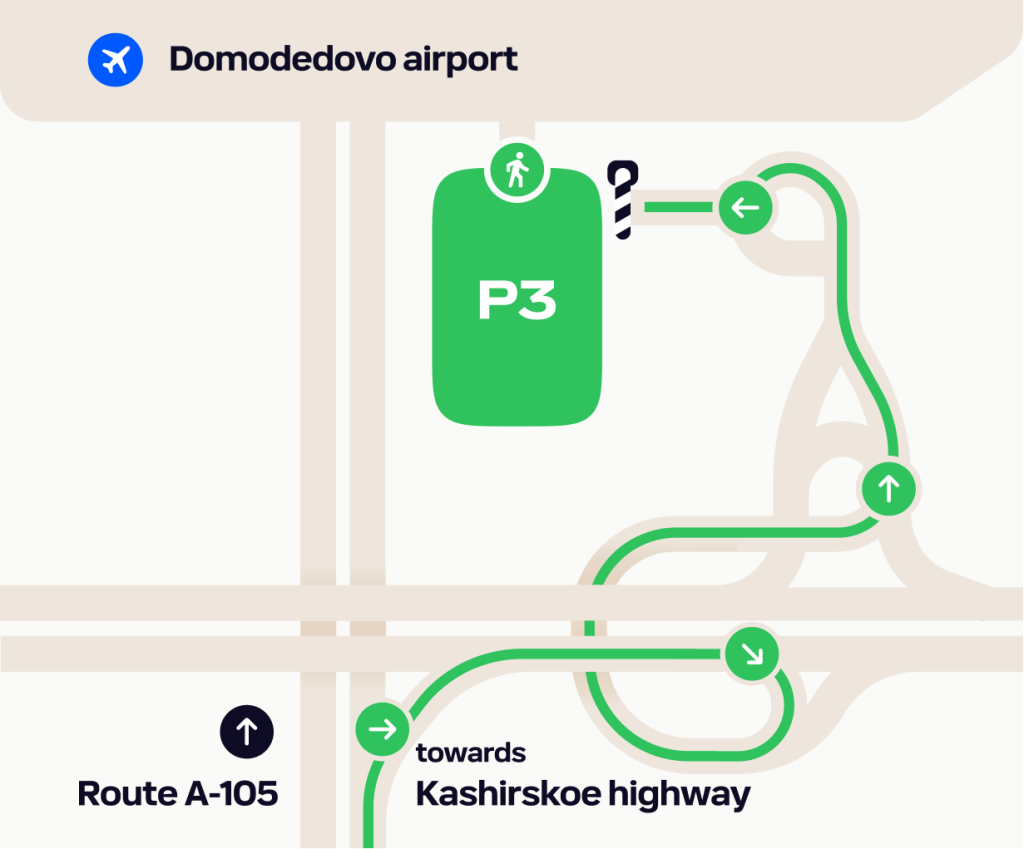
Take the detailed instructions — just in case:
- Drive along the route A-105 towards the airport and keep to the right side.
- Turn towards Kashirskoye highway about 4 km from the airport and then turn right at the ‘Домодедово карго аэрп. Домодедово’ road sign.
- Drive under the bridge, then turn on the ring at the second exit in the direction of ‘Карго Домодедово’ and drive straight.
- Turn into the P3 or P5 parking — cameras will see the Citydrive car, and the barrier will open.
- Park according to the road markings, complete the rental or switch to the Parking tariff option.
If the barrier at the entrance doesn’t open automatically, contact the parking operator using the terminal. This should help.
Is it allowed to leave the car not in the special parking space?
Yes, but it’s impossible to complete the rental there — only to switch to the Parking tariff option. And you will also have to take a parking ticket according to the rules of the airport and pay for the parking itself.
It’s acceptable to leave the car not in the special parking space, when you walk or meet someone and are going to drive back by the same car.
If you are running late for a flight and have no time to find the special parking space — follow the instructions in the next paragraph.
What to do if I’m running late for a flight and don’t have time to find the special parking?
- Park the car in the nearest airport parking, try to remember its number and leave the parking ticket in a prominent place in the car.
- Switch the rental to the Parking tariff option and hurry up for your flight.
- Call our support service as soon as possible and describe the situation — we will solve the problem, but you will have to pay for parking and a fine.
Support service phone number in Moscow: +7 (495) 223-06-90. Press 0 in the voice menu to switch to the operator immediately.
You can also write to we@citydrive.ru or using Citydrive app — on the Support section.
How to get from the airport to the special parking space?
Plot the walking route in a navigation app by «Domodedovo P3 parking», «Domodedovo P5 parking» or similar request. If this does not work out, copy the coordinates and plot the route to them: 55.415435°, 37.894371° or 55.417223°, 37.892262°.
You can also plot the route directly to the car:
- Open Citydrive app.
- Select a car at the P3 or P5 parking.
- Tap «Get directions» to be transferred to the navigation app.
If your navigation app show a lang way — don’t believe it:
- Leave the airport through exit № 4.
- Turn left.
- Go straight all the time — after about 100 meters from entrance № 4, the road will turn right and lead you to the P3 or P5 parking.
How to leave Domodedovo airport by Citydrive?
Just take a car and drive — parking tickets won’t be needed and the barrier will open automatically. If this doesn’t happen, contact the parking operator using the terminal.
Where to complete or start the rental?
At Sheremetyevo airport, you can complete or start the rental only at the 2 floor of multilevel parking of terminals C and D. The parking lot is in the purple (paid) zone. No parking tickets are needed to enter or exit.
How to get to parkings at Sheremetyevo from Moscow?
Plot routes in navigation apps — right to parkings, not just to the airport.
Navigation apps find find the right parkings by «Multilevel parking for terminal C» and similar requests. If this does not work out, copy the coordinates and plot the route to them:
- to the parking for terminal C — 55.981771, 37.406303.;
- to the parking for terminal D — 55.961213, 37.40677.;
When you will be near the airport, follow the instructions:
- Stop near the entrance to the parking — cameras will see the Citydrive car, and the barrier will open.
- Park according to the road markings on the floor of the parking.
- Complete the rental or switch to Parking tariff option.
If the barrier at the entrance doesn’t open automatically, contact the parking operator using the terminal. This should help.
Is it allowed to leave the car not in the special parking space?
Yes, but it’s impossible to complete the rental there — only to switch to the Parking tariff option. And you will also have to pay for the parking itself.
It’s acceptable to leave the car not in the special parking space, when you walk or meet someone and are going to drive back by the same car.
If you are running late for a flight and have no time to find the special parking space — follow the instructions in the next paragraph.
What to do if I’m running late for a flight and don’t have time to find the special parking?
- Park the car in the nearest airport parking, try to remember its number or letter and leave the parking ticket in a prominent place in the car.
- Switch the rental to the Parking tariff option and hurry up for your flight.
- Call our support service as soon as possible and describe the situation — we will solve the problem, but you will have to pay for parking and a 3 000 ₽ fine.
Support service phone number in Moscow: +7 (495) 223-06-90.
Press 0 in the voice menu to switch to the operator immediately.
You can also write to we@citydrive.ru or using Citydrive app — on the Support section.
How to get from the airport to special parking spaces?
Plot the walking routes in a navigation app by «Multilevel parking for terminal С», «Multilevel parking for terminal D» or similar requests. The parking of the C terminal is on the 2nd floor. If this does not work out, copy the coordinates and plot the route to them:
- to the parking for terminal С — 55.981771, 37.406303.;
- to the parking for terminal D — 55.961213°, 37.40677°.
You can also plot the route directly to the car:
- Open Citydrive app.
- Select a car at the P3 parking.
- Tap «Get directions» to be transferred to the navigation app.
And if the navigator still doesn’t find the way, then just go outside and look around — both parking lots are located opposite their terminals.
How to leave Sheremetyevo by Citydrive?
Just take a car and drive — parking tickets won’t be needed and the barrier will open automatically. If this doesn’t happen, contact the parking operator using the terminal.
Where to complete or start the rental?
At Vnukovo airport, you can complete or start the rental only at the forecourt’s open parking (terminal A). It’s indicated by the ‘Parking only for carsharing’ scoreboard.
The parking lot is in the purple (paid) zone. For entry and exit you will need a parking ticket. Read the details in «How to get to the parking from Moscow?» and «How to leave Vnukovo by Citydrive?» paragraphs.
How to get to the parking from Moscow?
It’s better to use navigation apps. Vnokovo’s special parking space doesn’t have any name, so copy the coordinates and plot the route to them: 55.604688°, 37.290483°.
When you will be near the airport, follow the instructions:
- Keep to the left side and follow the ‘Parking’ road signs above the road.
- Take the parking ticket near the barrier at the entrance to the forecourt.
- Drive straight for about 100 meters — to the ‘Parking only for carsharing’ scoreboard and another barrier.
- Open the barrier with your parking ticket and get it back.
- Park according to the to the road markings, complete the rental or switch to the Parking tariff option.
- Be sure to leave the parking ticket in a prominent place in the car, for example on the driver’s or front passenger seat.
Kind reminder. If you pick up the ticket, the next driver will lose time on the exit, and you will receive a fine.
Is it allowed to leave the car not in the special parking space?
Yes, but it’s impossible to complete the rental there — only to switch to the Parking tariff option. And you will also have to pay for the parking itself.
It’s acceptable to leave the car not in the special parking space, when you walk or meet someone and are going to drive back by the same car.
If you are running late for a flight and have no time to find the special parking space — follow the instructions in the next paragraph.
What to do if I’m running late for a flight and don’t have time to find the special parking?
- Park the car in the nearest airport parking, try to remember its number and leave the parking ticket in a prominent place in the car.
- Switch the rental to the Parking tariff option and hurry up for your flight.
- Call our support service as soon as possible and describe the situation — we will solve the problem, but you will have to pay for parking and a fine.
Support service phone number in Moscow: +7 (495) 223-06-90. Press 0 in the voice menu to switch to the operator immediately.
You can also write to we@citydrive.ru or using Citydrive app — on the Support section.
How to get from the airport to the special parking space?
It’s better to use navigation apps. Vnokovo’s special parking space doesn’t have any name, so copy the coordinates and plot the route to them: 55.604688°, 37.290483°.
You can also plot the route directly to the car:
- Open Citydrive app.
- Select a car at the P3 parking.
- Tap «Get directions» to be transferred to the navigation app.
If the navigator still can’t find the way:
- Go out of your terminal.
- Cross two roads and turn left.
- Go straight to the barrier and the «Parking only for car sharing» scoreboard.
How to leave Vnukovo by Citydrive
- Find the previous driver’s parking ticket in the car.
- Use the ticket to open the barrier at the exits from the parking, don’t forget to get the ticket back.
- Use it one more time to open the barrier at the exit from the forecourt.
If the barriers don’t open or the previous driver didn’t leave a ticket, contact the administration at the parking.
Where to complete or start the rental?
At Pulkovo airport, you can start and complete the rental only at P2 and P3 parkings. The parking lot is in the purple (paid) zone. No parking tickets are needed to enter or exit.
How to get to the parking at Pulkovo?
The only entrance to the territory is from the Pulkovo highway. Plan your way navigation apps — right to the parking, not just to the airport.
Navigation apps find the right parking by «Pulkovo P2 parking», «Pulkovo P3 parking» or similar requests. If this does not work out, copy the coordinates and plot the route to them:
- to P2 — 59.798596°, 30.276934°;
- to P3 — 59.798219°, 30.278389°.
No parking tickets are needed to enter or exit. When you arrive to the parking, the barrier will open automatically. If this does not happen, contact the operator through the terminal at the barrier.
Is it allowed to leave the car not in the special parking space?
Yes, but it’s impossible to complete the rental there — only to switch to the Parking tariff option. And you will also have to pay for the parking itself.
It’s acceptable to leave the car not in the special parking space, when you walk or meet someone and are going to drive back by the same car.
If you are running late for a flight and have no time to find the special parking space — follow the instructions in the next paragraph.
What to do if I’m running late for a flight and don’t have time to find the special parking?
- Park the car in the nearest airport parking, try to remember its number or letter and leave the parking ticket in a prominent place in the car.
- Switch the rental to the Parking tariff option and hurry up for your flight.
- Call our support service as soon as possible and describe the situation. We’ll solve the problem, but you will have to pay for parking and the 2 000 ₽ fine.
Support service phone number in Saint Petersburg: +7 (812) 313-69-20. Press 0 in the voice menu to switch to the operator immediately.
You can also write to we@citydrive.ru or using Citydrive app — on the Support section.
How to get to the parking from the airport?
Use signs on the territory or map apps. Navigation apps find the right parking by «Pulkovo P2 parking», «Pulkovo P3 parking» or similar requests. If this does not work out, copy the coordinates and plot the route to them:
- to P2 — 59.798596°, 30.276934°;
- to P3 — 59.798219°, 30.278389°.
You can also plot the route directly to the car:
- Open Citydrive app.
- Find and select a car at the parking.
- Tap «Get directions» to be transferred to the navigation app.
How to leave Pulkovo airport by Citydrive?
Just take a car and drive — parking tickets won’t be needed and the barrier will open automatically. If this doesn’t happen, contact the parking operator using the terminal.
Where to complete or start the rental?
At Sochi airport, you can complete or start the rental only at the Citydrive exclusive Parking. Entry and exit are free.
How to get to the parking at Sochi airport?
Plot routes in navigation apps — right to parkings, not just to the airport. There are the coordinates: 43.447678°, 39.933926°.
Detailed instructions — just in case:
1. Proceed along Mira Street towards the airport, stay in the far-right lane, and follow the signs for «Airport» and «24-Hour Parking».2. After the «Airport» hotel, turn right and then turn right again before reaching the barrier.
3. Proceed to the parking lot — the barrier near it will open automatically; If the barrier does not open, reverse 5 meters and approach it again. You do not need a ticket for this.
4. Park according to the markings, end the rental, or switch it to the «Parking» tariff option.
Is it allowed to leave the car not in the special parking space?
Yes, but it’s impossible to complete the rental there — only to switch to the Parking tariff option. And you will also have to pay for the parking itself.
It’s acceptable to leave the car not in the special parking space, when you walk or meet someone and are going to drive back by the same car.
If you are running late for a flight and have no time to find the special parking space — follow the instructions in the next paragraph.
What to do if I’m running late for a flight and don’t have time to find the special parking?
- Park the car in the nearest airport parking, try to remember its number or letter.
- Switch the rental to the Parking tariff option and hurry up for your flight.
- Call our support service as soon as possible and describe the situation. We’ll solve the problem, but you will have to pay for parking and the 3 000 ₽ fine.
Support service phone number in Saint Petersburg: +7 (862) 291-51-14. Press 0 in the voice menu to switch to the operator immediately.
You can also write to we@citydrive.ru or using Citydrive app — on the Support section.
How to get from the airport to the special parking space?
Plot a walking route in the navigator app by coordinates 43.447054°, 39.936770°.
You can also plot the route directly to the car:
- Open Citydrive app.
- Select a car at the parking.
- Tap «Get directions» to be transferred to the navigation app.
Alternatively, you can simply exit the airport, turn left, and continue straight until you reach the daily parking lot. You will see a spot marked with Citydrive flags.
How to leave Sochi airport by Citydrive?
If you need to exit the parking lot, follow the markings towards the exit. The barrier will open automatically.
If the barrier did not open, try reversing and approaching it again and stopping. If this does not help, call the support service: +7 (862) 291-51-14
Where to complete or start the rental?
The designated area is located in Parking Lot P1 (short-term), directly opposite the terminal exit,
on the 4th
lane.
Look for red cones — they mark the special Citydrive parking spots. This parking lot
is part of the purple
(paid) zone.
Coordinates: 56.751389, 60.802085
In your GPS: «Parking P1 Koltsovo»
How to get to the parking lot?
Enter from Bakhchivandzhi Street, turning into the driveway just before the Azimut Hotel.
Drive to the first
(leftmost) entry gate of the parking complex.
The barrier will open automatically — the system
recognizes your
license plate. No parking ticket is needed.
Once inside, find a spot in the designated
Citydrive zone (marked
purple in the app) and park within the lines.
Do I need to pay for parking?
Parking at Koltsovo Airport is in the purple (paid) zone — the cost is added to your rental fee in the app. You don’t need to pay anything on-site.
Is it allowed to leave the car not in the special parking space?
Yes, but you won’t be able to end the rental. You’ll need to switch to the «Parking» rate and:
- take a parking ticket
- pay for the parking manually
This option works if you’re picking someone up or planning to return with the same car.
What if I’m running late for my flight and can’t find the special parking?
If you’re short on time:
- Park at the nearest available spot.
- Note its number and leave the ticket clearly visible on the dashboard.
- Switch to the «Parking» rate in the app.
- Contact support as soon as you can.
Ekaterinburg support line: +7 (343) 221-76-48 (press «0» in the voice menu)
Or write
to us at we@citydrive.ru or
via the «Support» section in the app.
Important: Ending a rental on a closed paid parking lot without using the proper procedure will result in a 3 000 ₽ fine and you’ll also need to cover parking costs.
How to get to the parking lot from the airport terminal?
Exit the terminal building onto Bakhchivandzhi Square and walk straight ahead — Parking Lot P1 is right across from the exit. Citydrive spots are on the 4th lane, marked with red cones.
How to exit the Koltsovo parking lot?
Just drive up to the barrier — it will open automatically. No further action is needed.
Where can I end or start my lease?
At Zhukovsky Airport, you can end or start your rental only in parking lot P2. The parking lot is in the purple (paid) zone. No parking tickets are needed to enter or exit.
How to get to the parking lot from Moscow?
It’s better to use a navigator. For convenience, you can copy the coordinates and get directions to them: 55.560719, 38.115741.
When you arrive at the airport, follow the instructions:
1. Follow the road Narkomvod.2. Follow signs for Zhukovsky Airport.
3. Drive up to the parking lot — the cameras will see the Citydrive car, and the barrier will open.
4. When entering the airport, follow the designated parking lot P2 (green zone on the map in the Citydrive app).
5. Turn into parking lot P2 — the cameras will see the Citydrive car and the barrier will open.
6. Park according to the markings in any free space, end the rental or transfer it to the «Parking» tariff option.
If the barrier at the entrance does not open, first try to drive closer/farther, focusing on the reading camera; if unsuccessful attempts, contact the parking operator.
Is it possible to leave the car in a place other than the designated parking lot?
No, you won’t be able to end the lease — just transfer it to the «Parking» tariff option. You will also have to pay for the parking itself.
You can leave your car outside the designated parking lot P1 for 15 minutes when you are seeing off or meeting someone and are going to drive back in the same car. If you need more than 15 minutes, park your car in P2.
How to get to the parking lot from the airport?
The parking lot is located in front of the exit from the airport building after the short-term zone P1. It is better to build a walking route in the navigator. Copy the coordinates and get directions to them: 55.560719, 38.115741.
You can also pave the way directly to the car:
1. Open the Citydrive application.2. Select a car in the parking lot.
3. Click «Build a route» — you will be transferred to the application with maps.
If the navigator still cannot find the way, go out of your terminal and go straight to the indicated parking lot on the map.
How to get out of Zhukovsky using Citydrive?
Just take the car and drive — you won’t need a ticket, and the barrier will open automatically. If this does not happen, contact the parking operator using the terminal next to the barrier.
Yes. If you are driving a car with a transponder, you do not need to pay manually — barriers open automatically, and the money is debited contactless.
For cars without transponders, the payment is manual everywhere except Central Ring Road and the Northern Bypass of Odintsovo.
Transponder is a gadget which allows you to enter on toll roads almost without queques and pay for it contactless. When you are near a toll road, a special device scans the transponder’s signal and the barrier opens automatically. The money is debited contactless later.
- Open the car map in Citydrive app.
- Tap on the settings icon in the upper right corner and apply the Transponder filter.
- Take any available car and drive!
There are no barriers and toll collection points on the Central Ring Road. With or without a transponder, the money will be debited automatically from your Citydrive balance or bank card.
For the current tariffs, visit Avtodor’s website.
The camera will identify the vehicle, and the money will be deducted automatically from the balance in Citydrive or from the bank card — both with and without a transponder.
If you are driving a car without transponder:
- At the entrance to the toll road, take the lane under the road sign of cash or non-cash payment.
- Stop at the barrier and pay for your trip.
- When the barrier opens, drive as usual.
If you are driving a car with a transponder:
- At the entrance to the toll road, take the lane for cars with a transponder — it can be marked with a green road sign, the inscription ‘By transponder’ or ‘T-pass’.
- Stop at the barrier — it will open automatically.
- Drive as usual — the money will be debited from your Citydrive balance or bank card.
If you are driving a car without transponder:
- At the entrance to the toll road, take the lane under the yellow road sign of cash payment or the blue one with the picture of a bank card and a phone.
- Stop at the barrier and pay for your trip.
- When the barrier opens, drive as usual.
If you are driving a car with a transponder:
- At the entrance to the toll road, take the lane under the yellow road sign of cash payment or the green one with the picture of a car.
- Stop at the barrier — it will open automatically.
- Drive as usual — the money will be debited from your Citydrive balance or bank card.
For the current tariffs, visit Northern capital highway’s website.
If you are driving a car without transponder:
- At the entrance to the toll road, take the lane under the yellow road sign of cash or non-cash payment.
- Stop at the barrier and pay for your trip.
- When the barrier opens, drive as usual.
If you are driving a car with a transponder:
- At the entrance to the toll road, take the lane for cars with a transponder — it can be marked with a green road sign, the inscription ‘By transponder’ or ‘T-pass’.
- Stop at the barrier — it will open automatically.
- Drive as usual — the money will be debited from your Citydrive balance or bank card.
If you have a new bank card, link it in the app: side menu → your profile → Payment methods → Add a bank card.
In other cases, write to we@citydrive.ru:
- if your passport has changed, please send photos of the main spread and the registration page;
- if your driver’s license has changed — send photos of both sides;
- if the email has changed, write from it and specify the phone number you used to sign up in Citydrive.
- if the phone number has changed, send a selfie with the passport’s main spread, and specify the old and new numbers.
Booster is a seat without a backrest for passengers from 3 to 12 years old. A child seat has a backrest, it’s made for children weighing 9–36 kg.
You can find a suitable car by using the «Kids» filter. The car card will show what’s inside: a child seat or a booster.
How to start the car and change gears?
Tesla doesn’t need to be started, just push the brake pedal — the headlights will turn on.
To select a gear, hold down the brake pedal and bring the right-hand paddle to the D or R position.
How to set up mirrors and steering wheel?
Tap on the car icon on the main console and select «Mirrors» or «Steering Wheel». Then follow the on-screen instructions.
How to use autopilot?
It’s not possible yet. Russian roads are not ready for this. But you can use the cruise control. To do this, bring the right-hand paddle to the position of the speedometer icon.
How to turn on the wipers?
Press the button on the end face of the left-hand paddle.
How to open the glove box?
Tap on the car icon on the main console and then on the «Glove box» button.
Where is the emergency stop button?
It’s above the rearview mirror, near the interior lighting unit.
The car’s battery is running out. What to do?
If the charge is below 30%, you either need to complete the rental in the green zone, or request a charging cable by phone:
We will bring it to a convenient place and tell you where and how to recharge.
When you take a Tesla for a long time, it is better to request a charging cable in advance. Phone numbers are the same.
Citydrive For business is the carsharing in Moscow, Saint Petersburg, Sochi, Yekaterinburg, Nizhny Novgorod and Krasnodar. And it’s also a cool extra motivation for your colleagues. And is handy for any other trips.
You only pay for car rental and don’t care about car maintenance, parking, gas and insurance.
Yes. We have no restrictions on the minimum budget and business size. Use our short-term car rental for business.
Citydrive has:
- per-minute tariff for short trips;
- tariffs from 1 hour to 7 days for long trips;
- Fix — enter the destination address, and we calculate the cost immediately.
Per-minute tariff
It has three options with different costs:
- In use option — turns on when you start the car;
- Parking option — works if you have turned the car off, closed the doors in the app, but haven’t ended the rental;
- Handover option — if you are outside the rental completion zone and don’t need the car anymore, you pay for the rental time according to the Parking option until someone else picks up the car.
In the per-minute tariff the rental price depends on the class of the car, current discounts and additional options, such as casco insurance. A minute of renting the cheapest car will costs from 11 ₽ for In use option and 5,4 ₽ for Parking and Handover options.
Citydrive has dynamic pricing for the per-minute tariff. Prices depend on demand, the number of cars in your area, traffic jams, the day of the week and the time of day.
Tariffs from 1 hour to 7 days
They are made for travels and other long trips. You pay a fixed amount for the rental itself plus for each kilometer of your trip.
In Tariffs from 1 hour to 7 daysthe cost depends on the class of the car, current discounts and additional options, such as casco insurance. Prices start from 176 ₽ for 1 hour and 9 ₽/km.
In Moscow, there is dynamic pricing for 1-3 hours tariffs. Prices depend on demand, the number of cars in your area, traffic jams, the day of the week and the time of day.
Fix tariff
You enter the destination address, and we calculate the cost.
The time for the trip is limited, it may vary depending on the situation on the road. The countdown will start after the free booking and inspection. We will let you know when there are 5 minutes left. If the free time ends, but you haven’t started the trip yet, minutes will be charged according to the Parking option until you start driving.
It’s necessary to complete the rental in the arrival area. It is indicated by the green dotted line. If you complete the rental not in the arrival area or arrive later, the cost of the trip will be recalculated at the per-minute tariff.
Complete registration, fill out company information, top up your account and add employees. Now you can rent a car for business, and everything is ready for travel.
Everyone you add in your personal account on the website.
Employees need Citydrive accounts. They can sign up in the app if they are already 18 years.
When you add employees in your personal account, they will have a corporate account as one of the payment methods in the app.
Gas, car maintenance, CTP insurance, washing and open paid city parkings are our concern.
If your employee is not to blame for the accident, the culprit will pay for the repair.
If the fault is yours or mutual, you do not need to bear full responsibility. If the damage amount is less than 70 000 ₽, you’ll have to pay 50 000 ₽. And if the damage amount is more than 70 000 ₽, you’ll have to pay 50 000 ₽ plus 25% of the amount by which you exceeded the 70 000 ₽ threshold.
Just in case, you can also buy the casco insurance. If you are the culprit of a car accident and don’t violate any other Citydrive rules, the amount of your complany’s liability will be up to 15 000 ₽.
The casco insurance won’t be valid if you cause an accident by a gross violation of traffic rules:
- Exceeding the speed limit by more than 40 km/h;
- Overtaking in a place that prohibits the performance of the specified maneuver;
- Movement in the opposite direction in violation of traffic rules;
- Driving at a prohibited traffic light;
- Violation of the rules for crossing railway tracks;
Car sharing for business can be used for business trips and trips to meetings. It is prohibited to use vehicles directly for commercial activities, such as courier and postal delivery, taxis or cargo transportation. Opening a coffee shop on wheels won’t work either.
This is an opportunity to rent a car for people using a wheelchair.
This is an opportunity to rent a car from CityDrive carsharing for people who drive a manual transmission car.
Now this option is available in Moscow and Saint Petersburg. Specially equipped Kia Rio are available for rent.
In such a car, an additional manual control is installed — a special lever that duplicates the gas and brake pedals.
No, wheelchair-accessible parking is prohibited on such a car. A regular parking space will do.
Choose the appropriate time slot minimum 4 hours before the start of the rental and respond an inquiry from our operator. You can also leave a request immediately by calling Citydrive.
Yes, if necessary, our employee will help you get into the car. He will also show how to operate such a machine.
Tariffs from 1 hour to 7 days.
Citydrive Long-term is a car rental service without branding, available from 1 to 18 months. If you choose the buyout option, the term can be extended up to 60 months — or up to 84 months with a reduced final payment.
During the rental period, you use the car as if it were your own, anywhere in Russia except for Crimea, Donetsk and Luhansk People’s Republics, and the Zaporizhzhia and Kherson regions.
Fuel, parking, and car washes are on you — but we’ll take care of maintenance and tire services. Vehicle servicing is available in the cities where Citydrive operates.
You’re free from the hassles and extra costs of car ownership: maintenance, seasonal tire sets, tire fitting, repairs for breakdowns, road tax, and compulsory third-party liability insurance (OSAGO) are all included in your subscription. If repairs are needed, we’ll provide a replacement vehicle.
Fines (if any) will be automatically charged to your linked card. Our support team is always ready to answer any questions you may have.
- Changan Alsvin
- Omoda S5 Classic 2024
- Chery Tiggo 4 PRO
- Omoda S5 Joy 2023
- Geely Coolray
- Geely Emgrand
- GAC GS3 GB
- Baic X50 (Belgee = BAIC brand)
- Changan CS35
- Baic X50 Style (panoramic roof)
- Omoda C5 Fun 2WD, 2023
- Omoda C5 FL Drive 4WD
- Geely Atlas PRO
- Chery Tiggo 7 PRO MAX Active 2WD
- Chery Tiggo 7 PRO
- Haval Jolion Elite 2WD
- Geely Coolray Facelift 2024
- Exeed LX
- Chery Arrizo 8 («Arizzo» → standardized spelling)
- Changan Uni-S
- Chery Tiggo 7 PRO MAX AWD
- Haval H3 Tech+
- Changan Uni-T
- Changan Uni-V
- Exeed TXL AWD
- Tank 300
- Moskvich 3e EL
- Skywell ET5 Luxury+
- Volkswagen ID.4
- Volkswagen ID.6
- Tesla Model Y
We provide OSAGO as standard, covering accidents not caused by you. For greater protection, we recommend adding the optional CASCO coverage. Two plans are available:
1. CASCO with deductible:
- Economy: 15 000 ₽
- Comfort: 30 000 ₽
- Premium: 50 000 ₽
- Electric: 100 000 ₽
2. Full CASCO:
We cover all damage — provided the accident is officially documented per regulations.
Vehicles are available in Moscow, Saint Petersburg, Sochi, Nizhny Novgorod, Yekaterinburg and Krasnodar.
Please note: While you may drive the car anywhere in Russia, rentals are prohibited in Crimea, the DPR, the LPR, and the Zaporizhzhia and Kherson regions.
1. Be at least 18 years old.
2. Hold a Category B driver’s license.
3. Have a registered and active Citydrive app account.
Your Citydrive carsharing reputation score does not impact your eligibility for long-term rentals with Citydrive Long-term.
Yes, absolutely! Buyout is possible after your rental term ends. The buyout payment will be approximately 45%—55% of the vehicle’s market value. Note that this amount is predetermined and fixed in your contract.
For contracts with a buyout option lasting up to 84 months, the residual payment is amortized proportionally across the entire rental period.
You can call us at +7 (495) 225-84-89.
Actually, there are many differences. For example, with Rent:
- vehicles come without branding and with physical keys;
- includes an unlimited mileage option;
- you can add up to 5 drivers and share driving privileges;
- doorstep delivery at your chosen time and location;
- free airport drop-off;
- child seats available on request.
In short, Rent is ideal for vacations, road trips, and business travel across Russia — combining flexibility with comfort.
1. Properly report the accident (by calling Citydrive immediately + involving traffic police).
2. With insurance with deductible, liability is limited:
- 15 000 ₽ — Economy
- 30 000 ₽ — Comfort
- 50 000 ₽ — Premium
- 100 000 ₽ — Electric